


Image
Do you have questions about Mauve TV, the Mauve and Blanc video platform? Find the answer you are looking for below, or send us your question using the contact form below.
What is Mauve TV?
With Mauve TV, you won't miss a thing about RSCA. Mauve TV is the video platform for every fan of purple and white. It's the place where you can watch live matches (excluding JPL matches), find exclusive behind-the-scenes footage, watch press conferences, binge-watch documentaries, and much more.
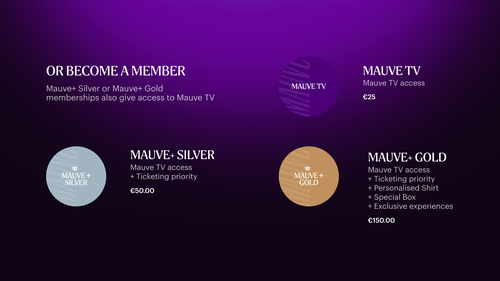
You can purchase access to Mauve TV separately for €25 per year. Or you can become a Mauve+ Silver or Mauve+ Gold member. In addition to a range of exclusive benefits, this membership also includes access to Mauve TV.
Where can I buy Mauve TV?
Mauve TV, Mauve+ Silver, and Mauve+ Gold are available for purchase at ticketing.rsca.be.
What can I expect from MAUVE TV?
✓ Watch pre-season friendlies and a selection of first-team matches live, including the European qualifiers against Hammarby, PAOK and Almaty.
✓ Go behind the scenes with Inside Neerpede, the documentary following daily life at RSC Anderlecht.
✓ Be the first to watch the most comprehensive Jupiler Pro League highlights every Monday, before they are published on social media.
✓ Watch press conferences, live or on demand.
✓ Rewatch documentaries and series such as MAUVE., Premier League Uncut, De School van Lukaku, RAW, and many more
Which matches can I watch on Mauve TV?
Do I also have priority for tickets with Mauve TV?
No, as a Mauve TV subscriber, you can watch all videos on Mauve TV, but you do not have priority access to tickets. Become a Mauve+ Silver or Mauve+ Gold member to get priority access to tickets.
How can I watch Mauve TV?
Mauve TV is accessible via mauvetv.rsca.be or in the RSCA App. You can watch it on your desktop, laptop, and mobile phone. Mauve TV can also be viewed on your TV via Chromecast.
How can I watch Mauve TV via the RSCA Official App?
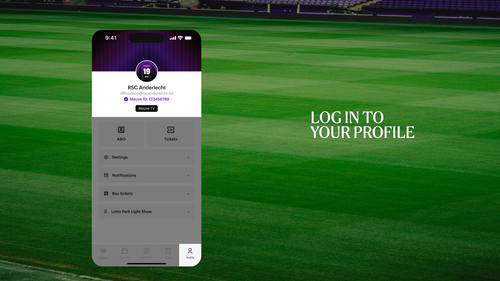
If you have access to Mauve TV, you can also enjoy all premium content via the RSCA Official App. Go to the ‘profile’ tab at the bottom right of the app and log in with the correct RSCA account.
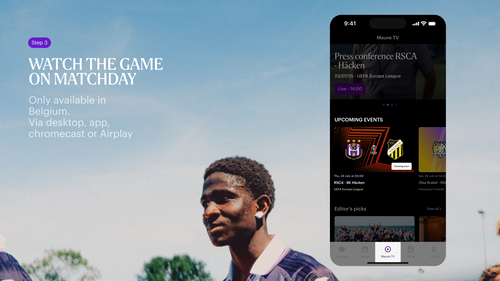
Do you have access to Mauve TV with your account? Then click on the Mauve TV icon at the bottom of the app and enjoy all the content on the video platform, from live matches to behind-the-scenes content.
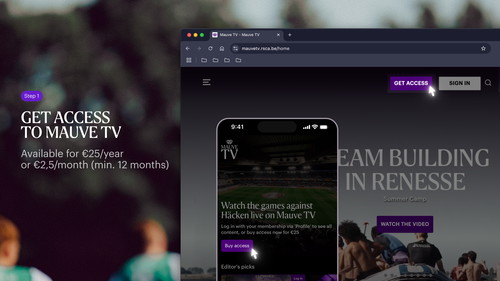
Don't have access to all the exclusive content yet? Purchase access to Mauve TV now for €25/year, or become a Mauve+ Silver or Mauve+ Gold member to enjoy other benefits as well.
Problems with live streams or access to Mauve TV
First, make sure you are logged in with the email address you used to purchase your Mauve TV subscription.
On Mauve TV, you can check this by clicking on the profile icon in the top right corner, then under “My Account” > “Account Details” to see which email address is being used.
If you want to watch Mauve TV via the RSCA Official App, click on the “Profile” tab at the bottom right and log in with the same account you used to purchase your Mauve TV membership.
If you have just purchased a membership and still don’t have access to premium content, try logging out and back in again.
If your internet connection is poor or unstable, Mauve TV will automatically lower the stream quality. Please check your connection.
A Mauve TV membership gives access to one connection on one device at a time. If you log in on another device, the previous connection will automatically be disconnected.
The matches are only available for viewers located in Belgium, due to international broadcasting rights that Mauve TV does not hold for European qualifying matches.
How can I upgrade to a Mauve+ membership
You can upgrade to a Mauve+ membership in two simple steps:
Once your request has been processed, we will refund the remaining amount of your current membership on a pro rata basis.
How long is my Mauve TV membership valid?
Each membership has a minimum term of 12 months. If you have a membership with recurring payments, it will be automatically renewed on the expiration date.
I want to cancel Mauve TV. How do I do this?
Each membership has a minimum term of 12 months. If you have a membership with recurring payments, it will be automatically renewed on the expiration date.
If you do not want this, you can cancel it one month before the expiration date under ‘my subscriptions’. You will receive an email about this as soon as you can do so.
CANCEL MY MEMBERSHIP