


Website & App
Do you have a question about using the new website? Or would you like to know more about the official RSCA app? Find the answers to all your questions below, or send us your question using the form below.
Where can I download the app?
The official RSCA app is available on both iOS and Android.

How do I log in/register in the app?
Log in with the email address linked to your RSCA account. If you don’t have an RSCA account yet, create one through the app under “Profile.”
Where can you find your tickets in the app?
Download the latest version of the RSCA app, log in with the profile to which your tickets have been assigned, then go to ‘Profile’ > ‘Tickets’ and open your ticket so it’s available offline. Connectivity in and around Lotto Park may be limited, so do this in advance. Scan the QR code upon entry.

How do I buy tickets?
- Click on “Fixtures” at the bottom.
- Go to the desired match.
- Log in.
- Select your seats and complete your purchase.
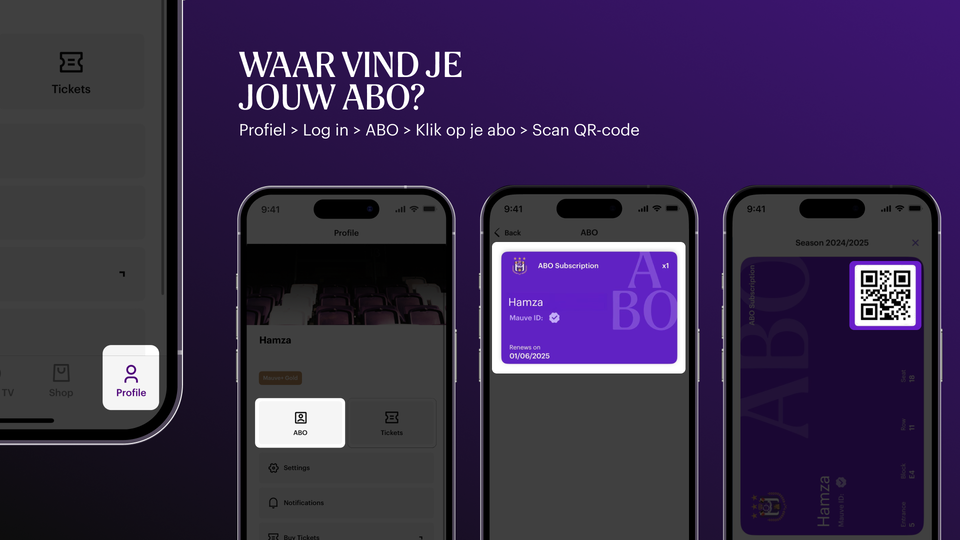
Where can I find my ABO?
- Make sure to log in with the email address linked to your season ticket.
- Click on “Profile” in the bottom right corner.
- Click on “Abo” (subscription) to manage your subscription details.
- Click on the abo card, your QR code appears and with this you can scan inside
As a season ticket holder, I don't see my individual tickets in the app
With our new app, subscribers no longer have individual tickets from the Jupiler Pro League. You can now scan inside via your subscription by clicking “abo". Next you will see the QR code with which you can scan inside.
How do I buy merchandise in the app?
Click on “Shop” at the bottom, choose your products, and check out easily using one of the various payment methods.
How do I watch Mauve TV in the app?
Click on “Mauve TV” at the bottom. If you’re a member, you can watch all videos. Make sure to log in with the email address linked to your membership.