


FAQ > Subscription
Please verify the following details before proceeding with your renewal:
- Can you renew your subscription yet? > Only 1 month before the expiration date
- Ensure your linked payment card is active and has sufficient funds.
- Decide if you want to keep your current payment frequency or switch (monthly vs. annually)
- Check if you have an available voucher from the RSCA Resale
Subscription renewal 2026
Subscription renewal 2026
How do I update my payment card before renewing?
It is essential that your linked card is valid. Otherwise, your renewal cannot be processed. If your current card has expired or is inactive, you must update it first:
- Click here
- Click on “add card”
- Scroll down, enter your phone number, and complete the €0,10 payment.
- Return to the my subscriptions section
- Click on “Change payment card” and assign the new card to your subscription
- Save your changes
How do I change my payment frequency (Monthly/Annually)?
- Navigate to my subscriptions
- Click on “Change payment term”
- Click “Confirm”
How do I check if I have a voucher from the RSCA resale?
- Log in to your RSCA account
- Scroll down to the “Vouchers” section
- If you have an active voucher, the total value will be displayed there
I cannot see my subscription in my RSCA account
This usually means someone else purchased and paid for your subscription last year. You can transfer it to your own account by following these steps:
- Go to my subscriptions
- In the overview, you will see the status “Owner”. This indicates the subscription was paid for via a different RSCA account last season
- Click on “change payer”
- Select the payment card you wish to use for the renewal and save
- Complete the purchase process
- Once finalized, the renewal rights will be permanently linked to your personal account
How do I renew my subscription?
- Go to my subscriptions
- Click “Renew now” (available from one month before the expiry date).
- Accept the Terms and Conditions
- If you have a credit from RSCA Resale, click on the purple code. The discount will be applied automatically to the total amount.
- Click “Confirm”
Note: If you manage multiple subscriptions, you must complete this process individually for each one.
How can I verify if my renewal was successful?
Check my subscriptions
If a new line has been created and your expiry date has been extended by one year, the renewal was successful.
You will also receive a confirmation email shortly after the transaction.
I want to transfer my subscription to someone else
If you do not wish to renew but want to transfer your seat to another person, please email us the following details. Do not renew the subscription yourself, or a transfer will no longer be possible.
- Your Mauve ID
- The Mauve ID and email address of the person taking over the seat
Please note: This is only possible starting with the last home game
I want to change my seat
If you wish to move to a different seat, do not renew your current subscription. Renewing will lock you into your current seat
From June 9 to June 10, you will have access (only if you let your subscription expire or actively canceled it before June 9) to the stadium seating chart to select a new seat. Log in with your RSCA account on our website, and you will see a pop-up appear with a link to the stadium seating chart.
If you do not see this pop-up, it means that you did not let your season ticket expire or actively cancel it before June 9. Please contact the ticketing department via the contact form, and they will grant you access.
Please note: it is not possible to move to a standing place.
I want to cancel my subscription
- Go to my subscriptions
- Click “Terminate subscriptions”
- Confirm your choice
I am on the waiting list, when can I buy a subscription?
You will receive an email as soon as it is your turn to purchase. This usually occurs between mid and late June, depending on your specific position on the waiting list.
General subscription info
General subscription info
How to use a digital subscription?
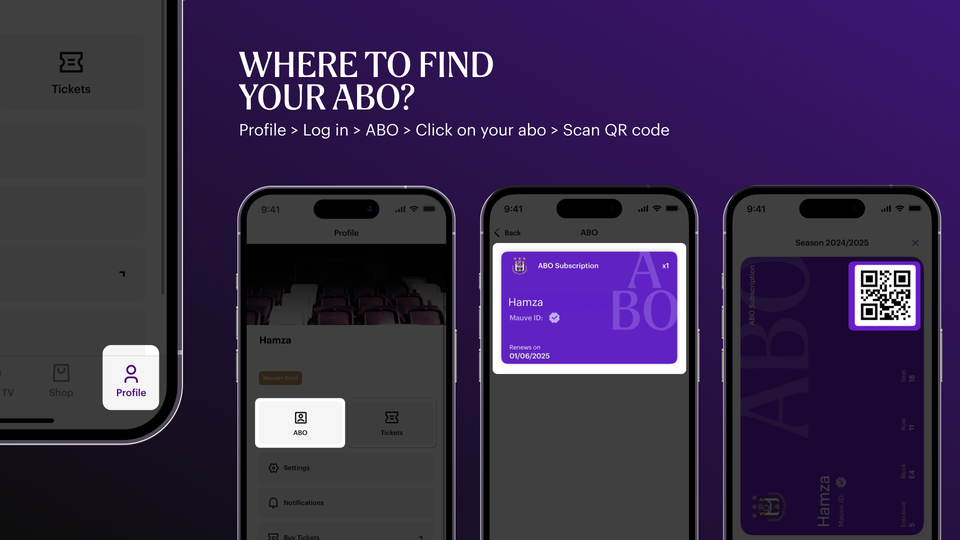
A digital subscription means you no longer receive a physical card. You simply scan your smartphone to enter the stadium.
VIA THE APP
- Download the latest version of the RSCA app from the App Store (Apple) or Google Play Store (Android).
- Open the app and log in with your RSCA account.
- Go to “Profile” (bottom right) and tap “ABO” (no longer “My Tickets”).
- Your subscriptions will appear — tap to open the QR code or add it to your digital Wallet.
- Scan the QR code in the App or Wallet to enter.
VIA THE TICKETING WEBSITE ON YOUR SMARTPHONE
- Go to ticketing.rsca.be.
- Log in with the email address linked to your subscription.
- Tap “Account.”
- You’ll see your digital subscription.
- Tap the card icon in the bottom left corner.
- Scan the barcode at the entrance.
VIA THE TICKETING WEBSITE ON YOUR COMPUTER
- Go to ticketing.rsca.be.
- Log in with the email address linked to your subscription.
- Click your name in the top right corner.
- Click “My Account.”
- Scroll down to “Cards.”
- You’ll see your digital subscription.
- Click the card icon in the bottom left corner.
- Scan the barcode to enter.
VIA SMS
- Go to ticketing.rsca.be.
- Log in with the email address linked to your subscription.
- Click your name in the top right corner.
- Click “My Account.”
- Scroll down to “Cards.”
- You’ll see your digital subscription.
- Click the SMS icon.
- Choose Apple or Android.
- Enter the mobile number.
- Click Send.
- The person who receives the SMS can scan the barcode to enter the stadium.
How can I find my monthly payment in my RSCA account?
With a monthly subscription, the amount is automatically debited on the same day of the month as your original purchase. You don’t need to do anything. You can view your monthly payments under My Subscriptions.
How can I change my payment card?
- Click here
- Click on “Add a card”
- Scroll down, enter your phone number, and pay €0.10
- Go to Options (top right) and click on My Subscriptions
- Click “Change payment card” and select your new payment method
- Save your changes
- Your payment card has now been updated
Where can I find my invoice?
Do you want to receive an invoice for your purchase? That can be easily done via the pop-up notification during the purchase. (check 'I wish to receive an invoice').
Next, to download it, go to orders. Choose the purchase for which you want an invoice and click on 'Download invoice'.
Note: Request your invoice immediately during the purchase. After this, you will not be able to create it yourself anymore.
About your payment
You are subscribing to a subscription for a 12-month period. During this period, you can enjoy the home matches in the Jupiler Pro League.
Your payment is set up as recurring and will be automatically charged annually or monthly. Before your subscription expires, you will have the opportunity to renew, transfer, or cancel your subscription.
Will the money be automatically withdrawn from my account?
Yes, once you have purchased the monthly subscription, the amount will be automatically withdrawn from your account each month on the purchase date. You don’t need to do anything else.
When will the money be withdrawn from my account?
The amount will be automatically withdrawn from your account each month on the purchase date. You don’t need to do anything else.
What is included in your subscription?
- JPL Subscription
- Challenger Pro League Subscription (RSCA Futures)
- Lotto Super League Subscription (RSCA Women)
- Priority access to Belgian Cup matches
- Priority access to European matches
- 10% discount in the RSCA shop
About the duration of your subscription
You are subscribing for a 12-month period. This period starts no earlier than June 1, 2025. In other words, your subscription will run until at least June 1, 2026. If you purchase a subscription during the season, it will also run for 12 months, meaning your subscription will include matches from the next season as well.
What is the difference between an annual and a monthly subscription?
You can choose to pay in full upfront or monthly.
If you choose an annual subscription, you pay the same as last season. If you choose monthly payments, the price is slightly higher. In both cases, you are committing to a 12-month period.
About the cancellation period
You subscribe for a minimum period of 12 months.
If you wish to cancel your subscription, you can only do so from 1 month before it expires; you will receive an email from us regarding this. You can find your subscription's expiry date under my subscriptions in your RSCA profile.
If you purchase a subscription during the season, it will also run for 12 months, meaning your purchase also covers the first matches of the following season.
Which personal details are mandatory when purchasing a subscription?
To purchase a subscription, you must first create an RSCA profile and verify it using Itsme or Onfido. This is a mandatory requirement under Belgian football law.
You are also required to provide a valid mobile number so that we can contact you should there be any issues with your subscription payment.
